Boostabulary — a word list and exercises from a photo of a page
Boostabulary
A vocabulary generator from text, a photo, or your own word list

A vocabulary bank from your own material
with spaced repetition

Boostabulary turns any text or photo into a word list, Cambridge-style exercises, and a spaced-repetition system — no manual work.

  • Multiple choice, word formation, and matching in one set
  • Each word’s level is an honest CEFR call, never inflated to fit the order
  • Your vocabulary bank with spaced repetition stays yours for good
Try for free 3 days free, no card required

“This tool helps me learn vocabulary every day and prepare for my own exam” — Mariia, creator of Boostabulary
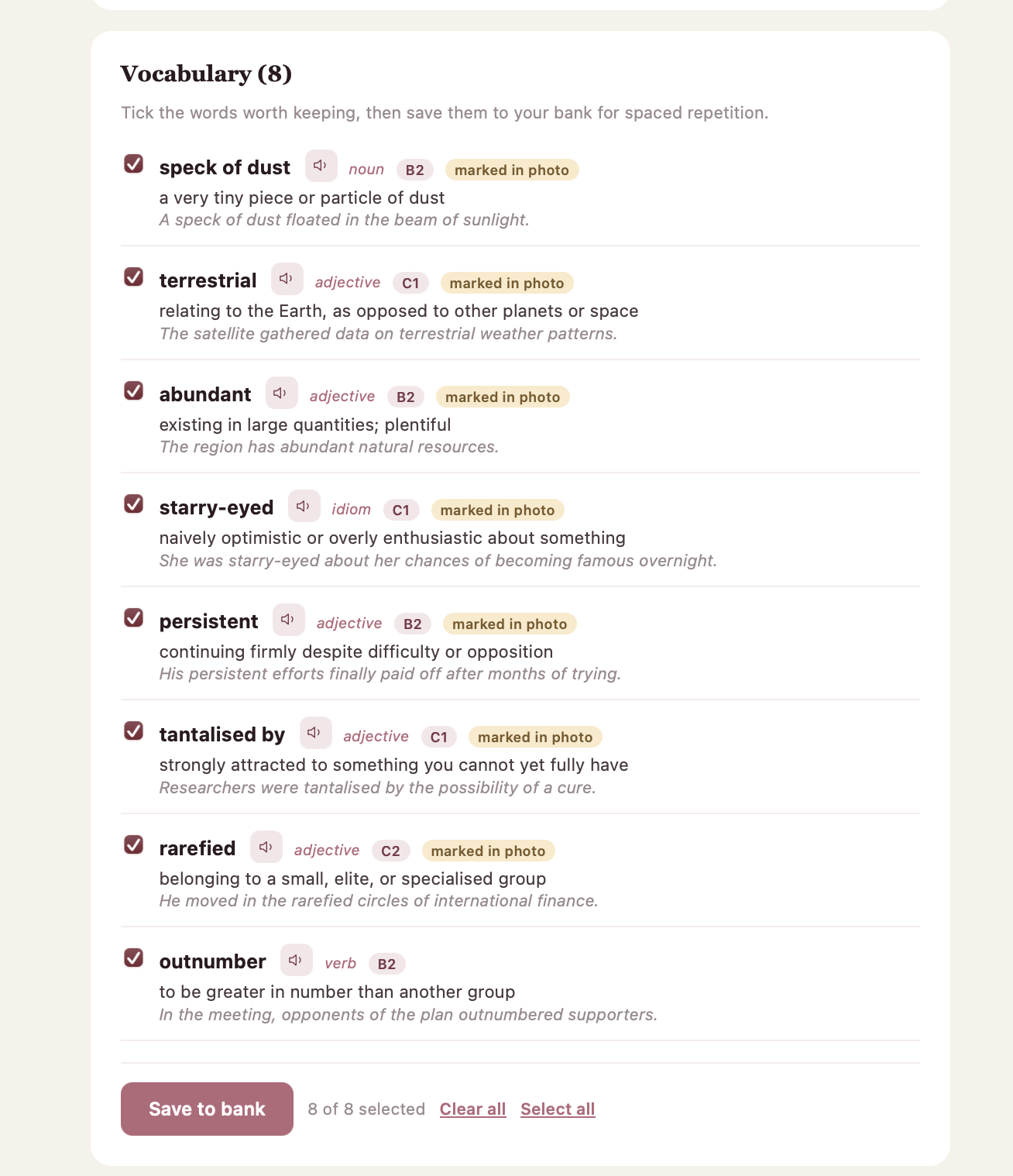
A generated list of eight words with definitions and examples
7 generations free during the trial
B1–C2 Preliminary through Proficiency
3 days free, no card needed
5 levels of repetition — no word gets left behind

Who Boostabulary is for — do you recognise yourself?

English teachers

Preparing lesson materials every week

  • You find the perfect text for a lesson in the evening — then spend two more hours building exercises for it
  • You’re never quite sure how to ask an AI chat to generate exercises for this exact text — and end up rewriting the prompt every time
  • You look the word up in a dictionary, check pronunciation separately, and keep review flashcards somewhere else entirely

See a ready example of the result →

Cambridge exam candidates

Preparing for First, Advanced, or Proficiency

  • The practice exercises you find don’t always match the real exam format — you end up training on the wrong thing
  • A mock test throws in words that never showed up in any of your prep materials
  • Exam day keeps getting closer, and the word list to learn never seems to end

See an example: Cambridge-style exercises and a CEFR level →

Learning English for yourself

No exam — you just want to know the language better

  • You hear a great word in a podcast, jot it in your phone’s notes — a week later you can’t even recall what it was
  • Words live in notes, screenshots, and bookmarks — and you never actually go back to them
  • There’s no exam forcing you to review — so a word gets read once and forgotten

See an example word list you can save to a review bank →

Why Boostabulary

English teachers

One request → a complete set: multiple choice, word formation, and matching together, in the same structure every time

No prompt to write — upload a text or photo, and the algorithm decides what and how to generate

The word, transcription, and audio all appear together in one word list

Cambridge exam candidates

Exercises are generated in the exact Cambridge Use of English format — the same task types as the real exam

Every word gets a CEFR level right away, judged consistently — regardless of the topic of the surrounding text

Tick the words worth learning — they’re saved to your spaced-repetition bank in one click

Learning English for yourself

Tick a word and it’s saved to your repetition bank — the system reminds you when it’s time to review

One word list — from notes, memory, or anywhere else — in one place instead of scattered records

No deadline needed — the app shows you how many words are due for review today

+ Audio for every word, British accent + Every answer comes with an explanation of why it’s right or wrong + Add an icon to your phone’s home screen

Three steps

  1. 01

    Upload

    A photo of a page, a text to read, or your own word list — for photos and texts, the system also adds more words at your chosen level

  2. 02

    Get

    A word list with transcription, audio, and a CEFR level for every word, plus three exercise types — all in one request

  3. 03

    Review

    With the Leitner system: a correct answer means the word comes back less often, a mistake means more often

Ready to try it right now? Try for free

What it looks like

Real screens, not mockups.

Upload

Upload

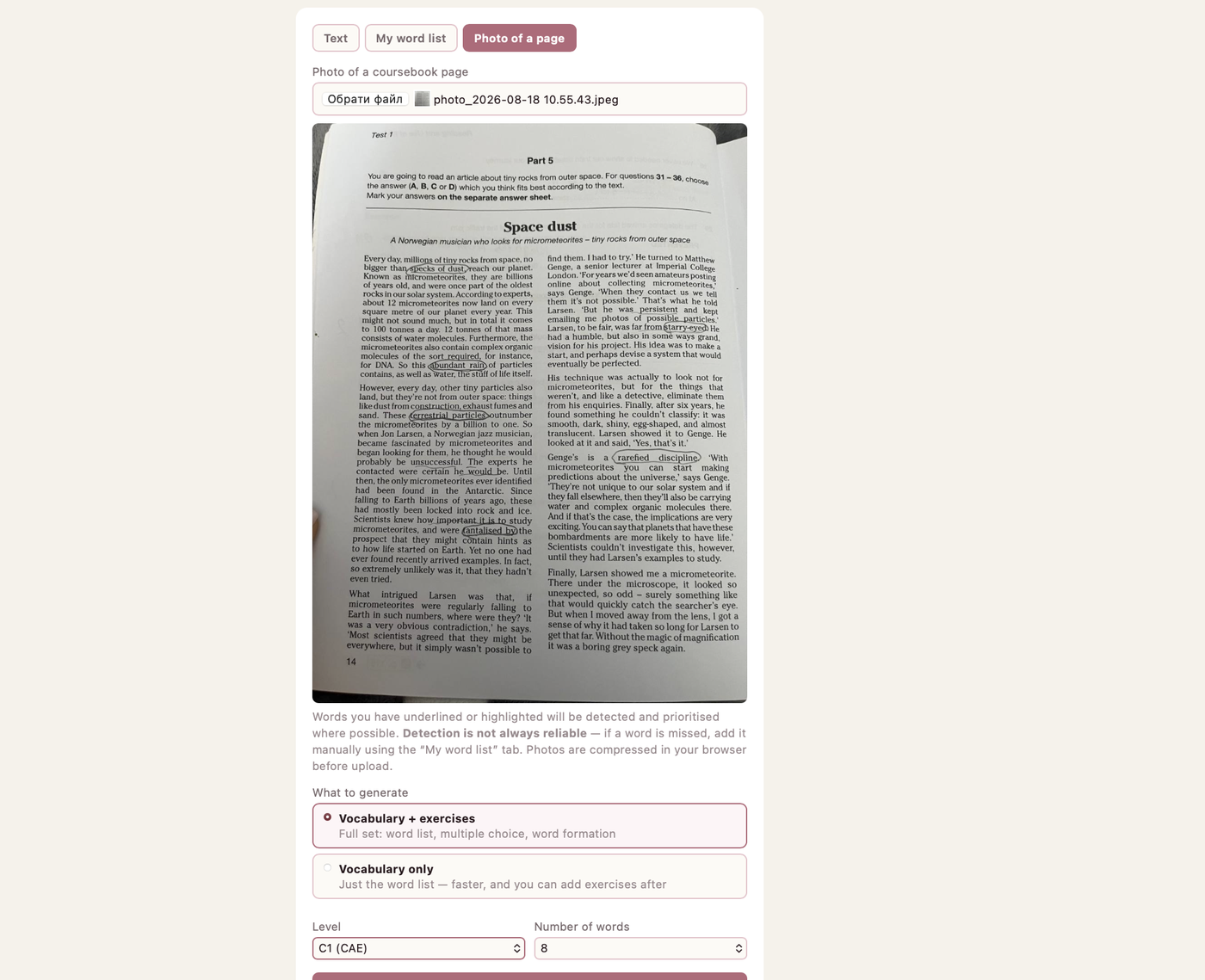
A photo of a page, a text, or your own list. Underlined words are picked up first.

Word list

Word list

Definition, example, part of speech, level and audio for every word.

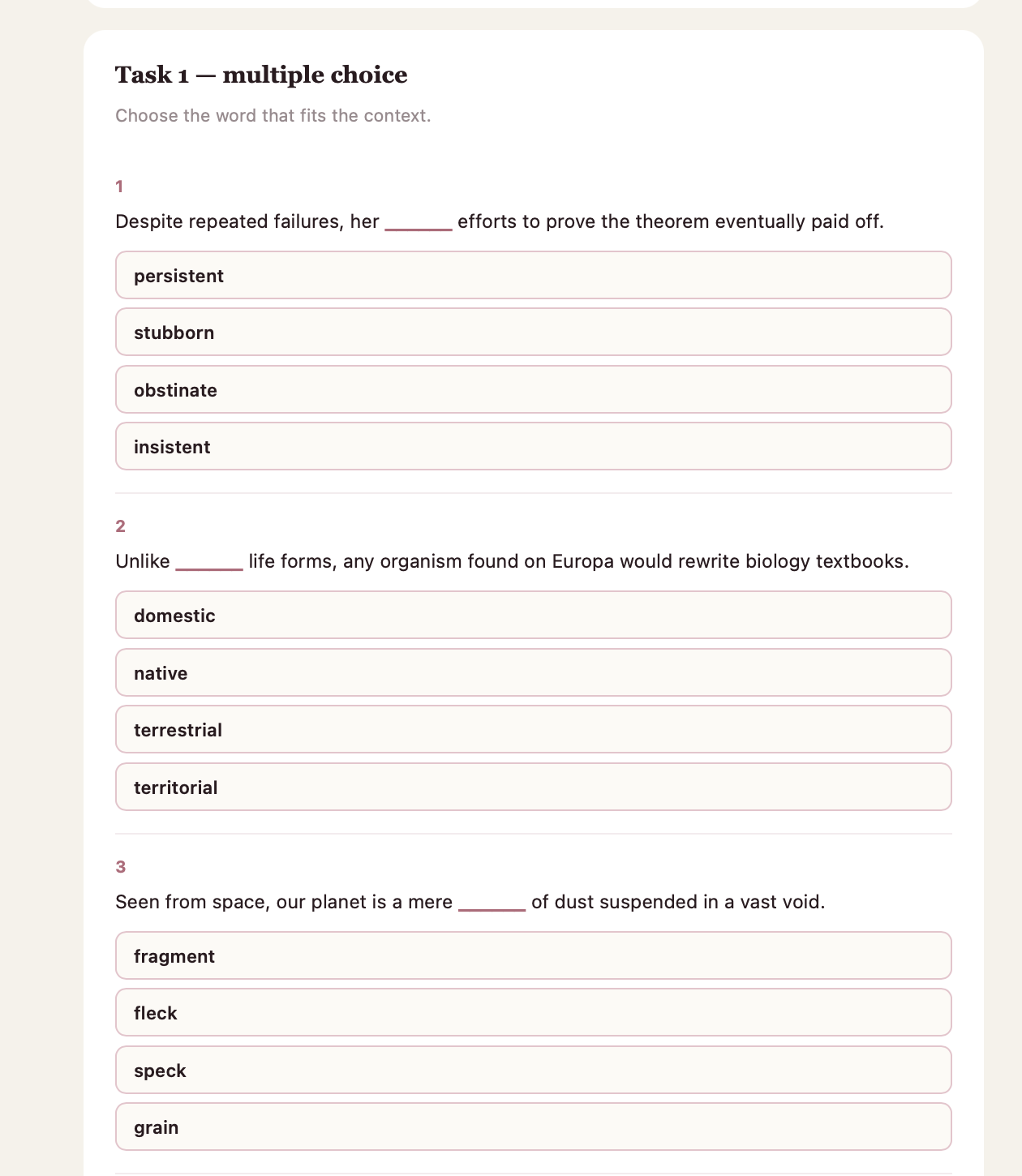
Multiple choice

Multiple choice

Distractors are deliberately similar, and the order changes every time.

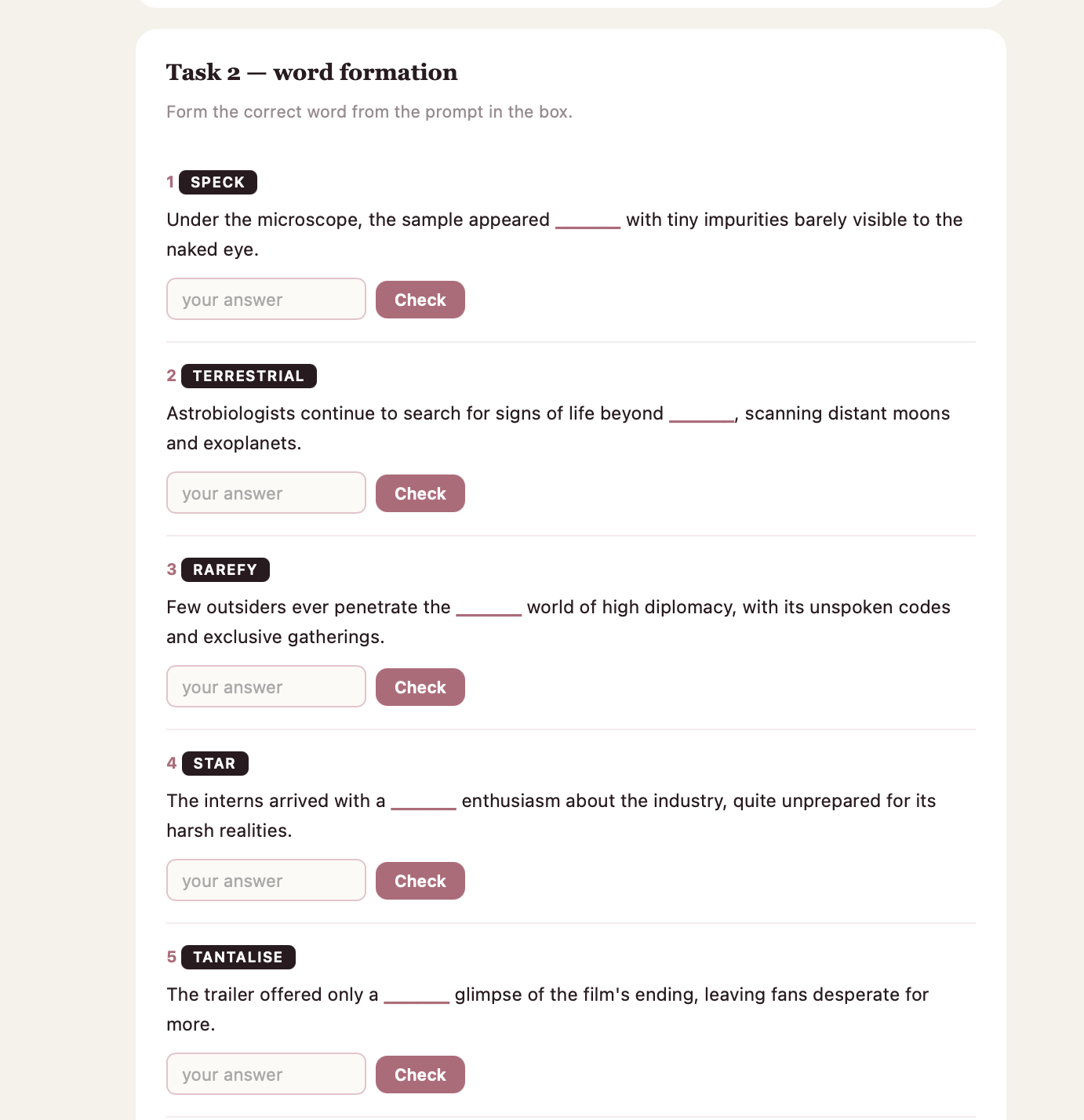
Word formation

Word formation

Build the word from the prompt in the box — as in Cambridge Use of English.

Words don’t vanish once the test is over

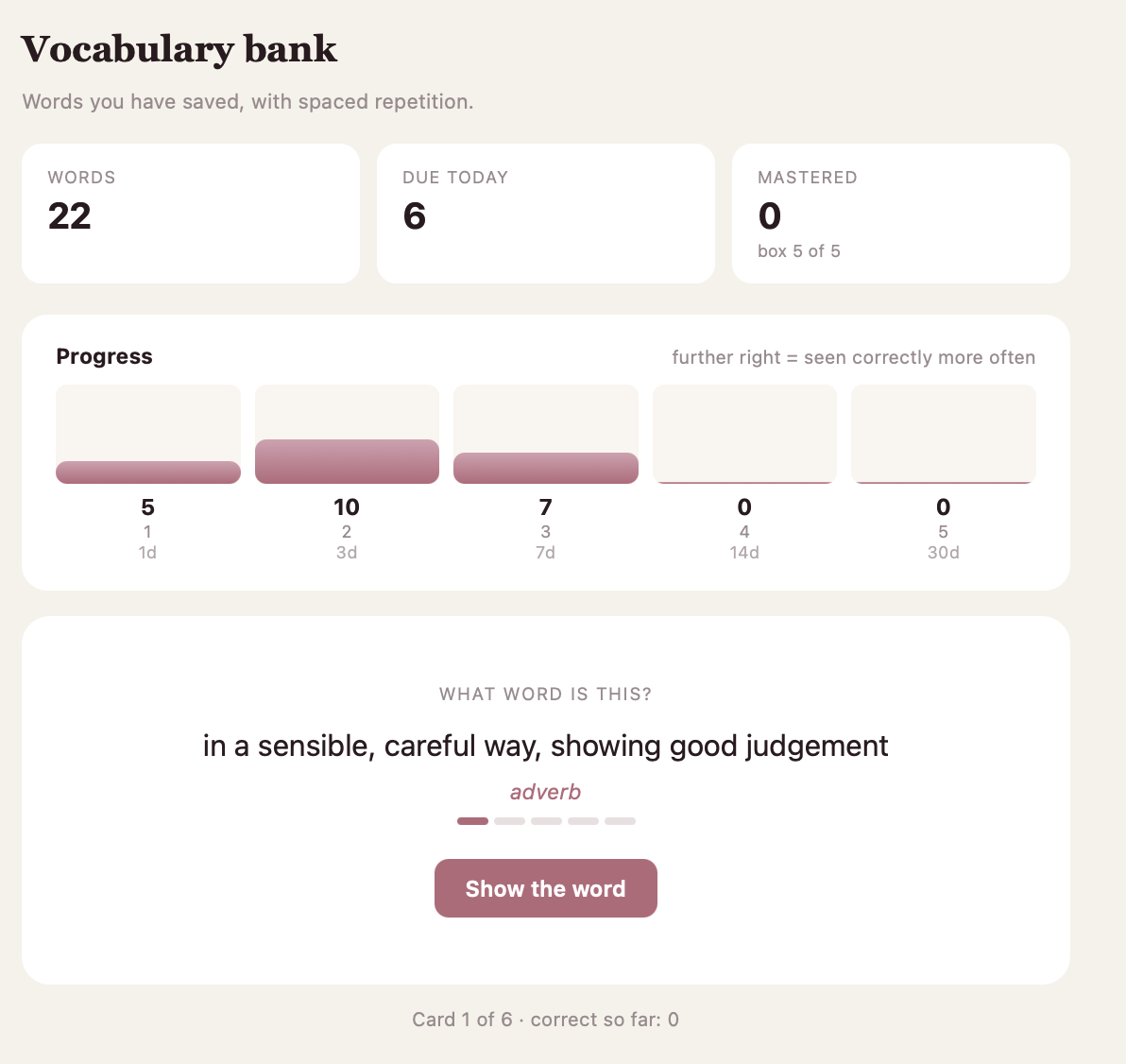
Every word you save goes into your vocabulary bank and comes back on the Leitner schedule: 1, 3, 7, 14 and 30 days. A correct answer moves a word forward; a mistake sends it back a level.

  • The bank stays available even when your generation limit runs out
  • Flashcards: definition on the front, word and audio on the back
  • See at a glance how many words are due today
Vocabulary bank showing words spread across five repetition levels

The project’s author

Mariia Bilous holding a Cambridge Advanced coursebook

My name is Mariia, and I’m a teacher with international Cambridge qualifications — DELTA, CELTA, and CELT-S. I head the methodology department at an online language school.

But knowing a language and passing an exam in it are two different things. Right now I’m studying for C1 Advanced myself. I tried several trainers, but new vocabulary kept slipping away: I’d learn a word today and forget it within a week — because none of them offered to bring it back a second time.

Words stick only when there’s a repetition system behind them, not just a list. I see the same thing working with my own students.

I couldn’t find a ready-made service that combined Cambridge-style exercises, an unbiased level assessment, and real spaced repetition — so I built one myself.

— Mariia Bilous, creator of Boostabulary

Pricing

Every plan starts with three free days.

Standard

$4.99/mo

50 generations a month

  • All 3 exercise types
  • Unlimited vocabulary bank
  • Audio for every word
  • Cancel in one click
Try for free
Most popular

Plus

$9.99/mo

150 generations a month

  • All 3 exercise types
  • Unlimited vocabulary bank
  • Audio for every word
  • Cancel in one click
Try for free

Unlimited

$24.99/mo

Unlimited generations

  • All 3 exercise types
  • Unlimited vocabulary bank
  • Audio for every word
  • Cancel in one click
Try for free

Billed monthly through WayForPay. Your vocabulary bank stays available even after a subscription ends.

Invite friends — save on your subscription

Every friend who takes out a paid subscription through your link gives you a free month.

  • 1 free month for every friend who subscribes
  • You don’t need to pay yourself to earn the bonus
  • Up to 3 free months per 30 days

Your link appears in your profile right after you sign up.

Questions

How accurate is the word-level detection?
The model gives a CEFR call for every word, without bending it to fit your order — but it’s a guide, not a certified assessment. A half-level gap is possible, just as it would be with any teacher.
Do I need a card to register?
No. The trial is 3 days and 7 generations, with no card.
What happens to my photo after generation?
It’s used once and isn’t stored on our servers after processing.
How do I cancel my subscription?
For +380 phone numbers — on your own in the WayForPay account panel; it stays active until the end of the paid period, and your vocabulary bank remains accessible. For other countries, the WayForPay panel doesn’t support self-service cancellation — email bilous.mariia04@gmail.com and it’ll be cancelled by hand.
Can I change my plan?
Yes, from your profile, one click, no extra conditions.
Can I use Boostabulary for free?
Yes — invite friends: everyone who takes out a paid subscription through your link gives you a free month (up to 3 months per 30 days). You don’t need to pay yourself for this. Your link appears in your profile right after signing up.
How do I install Boostabulary on my phone’s home screen?
On Android, Chrome usually shows an “Add to Home Screen” prompt at the bottom of the screen — just tap it. If it didn’t appear, open the browser menu (three dots) → “Add to Home Screen”. On iPhone, in Safari, tap the Share button (the square with an arrow pointing up) → “Add to Home Screen”.

Stop building exercises by hand and forgetting the words you’ve learned

See a ready example of the result first — then create an account and get a word list and exercises from your own text or photo today.

Try for free

3 days free · no card · cancel anytime

Try for free